
Sight Tape Calculator: Two Marks In, a True-Scale Tape Out
Shoot two distances, read where your sight housing sits on a scale, and enter those marks with your arrow speed and peep height. The calculator fits a trajectory-shaped tape through your own marks, gives you a position for every yard, and prints it at true size with a 100 mm line so you can prove the printer didn’t shrink it.

A sight tape is a curve with two unknowns: where it starts and how stretched it is. Your marks pin both. Shoot 20 and 60 yards (wider if you can shoot it clean), read the housing position on a fixed scale to the nearest half millimeter, and enter those readings with a chronograph speed and your peep-to-arrow height. Inside your marks the speed barely matters: a 30 fps error moves the 30 to 50 yard marks by about 0.2 mm. Past your longest mark it matters more, so the calculator labels those marks and refuses to go more than 40% of your measured span beyond it.
Jump to: calculator · how to take the marks · how the math works · how much speed matters · printing at true size · FAQ
How Do I Make a Sight Tape From My Own Marks?
Fill in at least two marks below. Positions are read from one fixed scale on your sight, such as the blank setup tape that came with it or the printable setup ruler further down this page. Everything runs in your browser; nothing you type is sent anywhere.
1 · Your sight marks
| # | Distance (yd) | Scale reading (mm) | Remove |
|---|
Read every mark from the same zero on the same scale, with the housing locked where that distance hit dead center. Repeat readings at one distance are fine; both are kept.
2 · Your arrow and bow
Uncertainty settings (assumptions you can change)
3 · Your tape
Screen preview, enlarged. The print and the SVG download are true size.
4 · Mark table
5 · Fit and check
6 · Reproducibility summary
How Do I Take Sight Marks the Calculator Can Use?
The calculator only knows what your marks tell it, so the marks are where the accuracy comes from. Here’s the routine I’d follow. It mirrors what the makers describe: HHA’s instructions have you lock the needle at 60 yards on a 0–80 setup tape and roll a tape until its 20 falls on your 20 yard mark, and S&S Archery’s Black Gold walkthrough uses pencil marks at 20 and 60 yards the same way.
- Put a scale on the sight. Use your sight’s blank setup tape or print the setup ruler below and stick it where the tape goes. It has to stay put until you’re done. Setup-tape numbers aren’t millimeters, so if you read those, pick Sight’s scale numbers in the calculator and measure how many millimeters one unit spans.
- Level the sight first. Set the 2nd and 3rd axis before you take a single mark; a forum poster in a Black Gold Ascent setup thread put that first: “Make sure the 1st, 2nd, and 3rd axis is set correctly before anything”.
- Zero at your short distance. Shoot groups at 20 yards with the arrows and head you’ll actually use, adjust until dead center, lock the housing and read the scale under the pointer. Half a millimeter is a realistic reading. If your broadheads and field points don’t group together yet, tune the bow first; marks taken on a bow that isn’t tuned move when it is.
- Shoot your long distance. Move back, adjust only the elevation, and read again. 60 yards is the common choice; farther gives a better tape if your groups at that range are tight.
- Add a middle distance. 40 yards is enough. It’s your check: if it doesn’t agree with the other two, one of the three readings is wrong, and the calculator tells you.
- Measure peep height and get a speed. Peep center to arrow center along the string, and a chronograph reading of the same arrow. A speed worked out from the bow’s rating runs high, since IBO numbers come from a light test arrow.
Don’t mix arrows, heads or release settings between marks. Each change moves the impact point, and the calculator will happily fit a tape through numbers from two different setups.
How Does the Calculator Turn Two Marks Into a Whole Tape?
As far as I can tell from how they’re matched, every pre-printed tape set is built on the same idea, even when the maker doesn’t spell it out. Spot-Hogg ships 40 tapes “for varying bow speed” with calibration tapes to pick one, and the Black Gold Ascent Verdict comes with 54 sight tapes. Each tape in a set is one shape of curve. Your two marks pick the shape that passes through both of them. I wanted the shape to come from the arrow’s flight instead of a chart, so here’s what the calculator does.
s = housing position on your scale · d = distance · ψ(d) = angle between the launch line and the line of sight that lands the arrow on the line of sight at d · b = sight radius (times the gear ratio on a dial sight) · a = where your scale’s zero happens to be
- ψ(d) comes from physics. The calculator flies a point-mass arrow in 2-D, starting h below your eye, with gravity and the same drag constants every ArcheryEra tool uses (speed falls as
v = v₀·e−k·s; k is set by fletching and head). It solves for the launch angle that brings the arrow back to your line of sight at d. - a and b come from your marks. They’re fitted by ordinary least squares on a straight-line model, since s is linear in tan ψ. Two marks give an exact fit. Three or more leave residuals, and those are your quality check.
- The leave-one-out check. With three or more distances, each one is dropped in turn, the tape is refitted on the rest, and the dropped mark is predicted. That prediction is independent of the mark it’s compared against. A mark that misses by more than three reading steps (or 1 mm, whichever is larger) gets flagged.
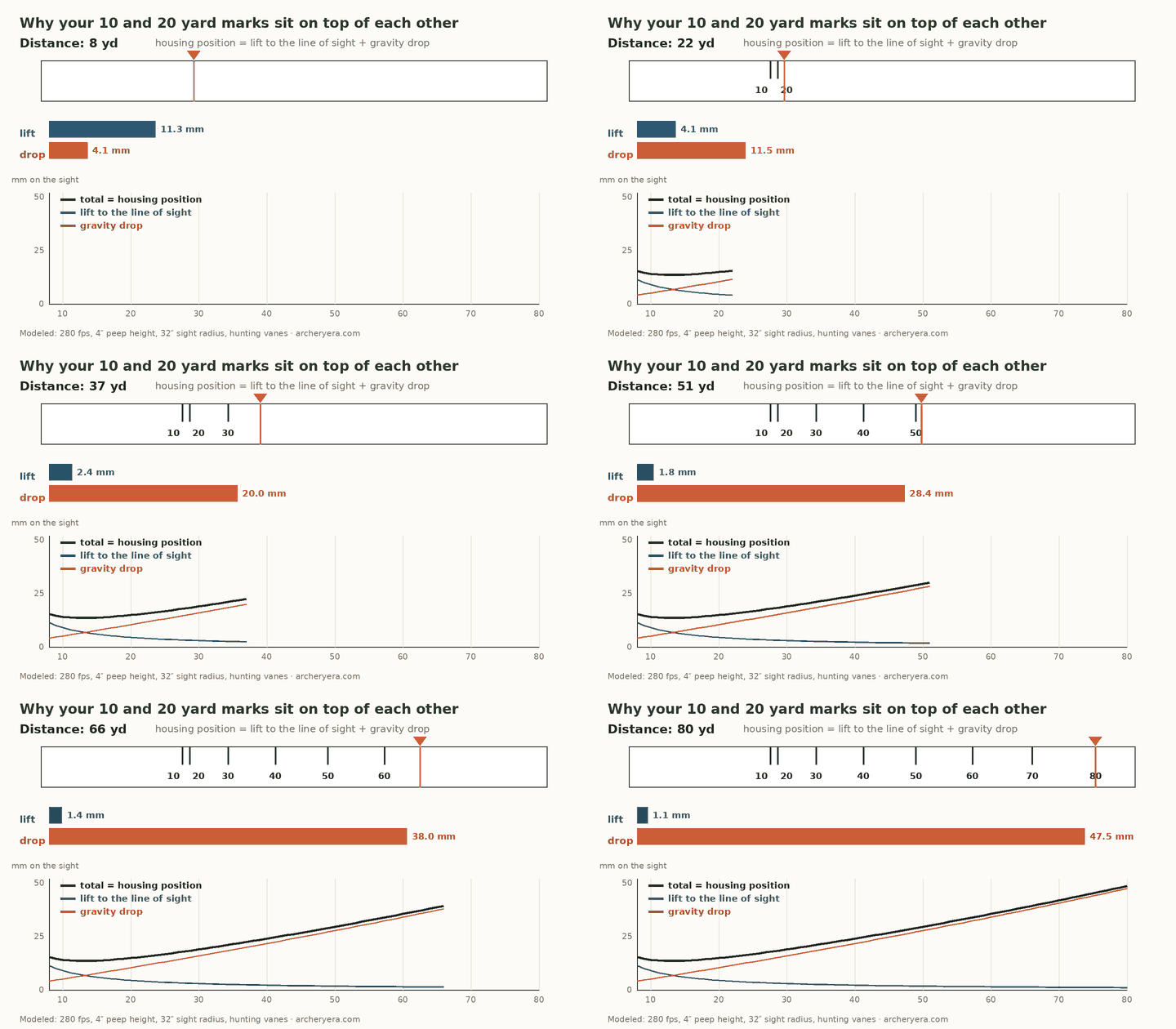
Two things fall out of this that I didn’t expect before running it. First, b is your sight radius. If your marks imply a 9-inch or 70-inch radius on a flat slider, a reading or a distance is wrong, and the calculator stops instead of printing nonsense. Second, the short end of the tape is strange. Your eye sits a few inches above the arrow, and at 10 to 20 yards most of the aiming angle goes to lifting the arrow up to your line of sight. That’s why short marks bunch up.
| Arrow speed | 10 yd | 30 yd | 40 yd | 60 yd | 80 yd | 100 yd |
|---|---|---|---|---|---|---|
| 240 fps | −2.7 | 6.0 | 13.2 | 29.2 | 47.3 | 67.4 |
| 280 fps | −0.8 | 4.0 | 9.1 | 20.6 | 33.7 | 48.2 |
| 320 fps | +0.4 | 2.7 | 6.4 | 15.1 | 25.0 | 35.9 |
Millimeters from the 20 yard mark, modeled with the calculator’s engine: 32″ sight radius, 4″ peep height, hunting vanes, field points. At 320 fps the 10 yard mark lands past the 20.
How Much Does a Wrong Speed or Peep Height Move the Marks?
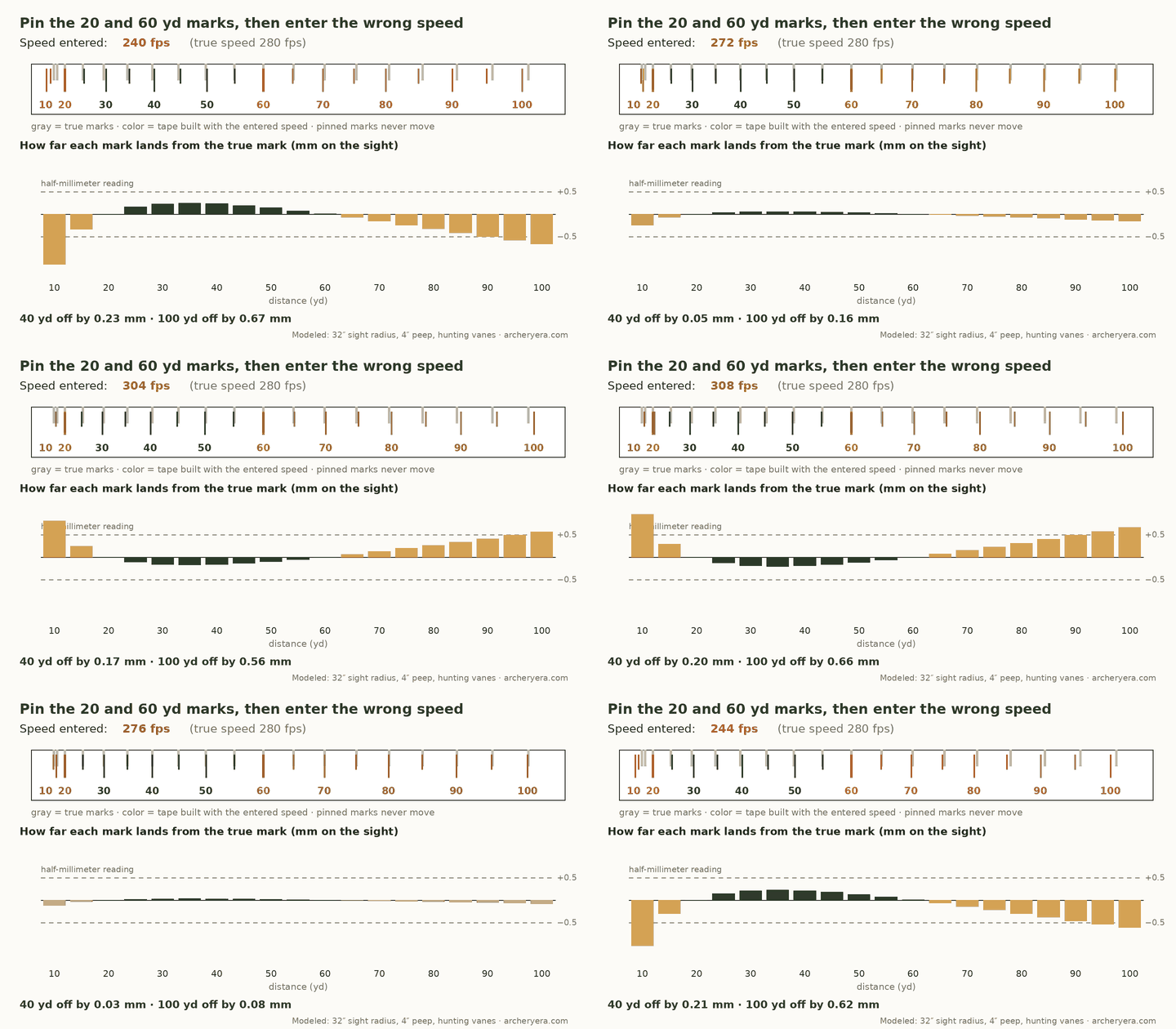
This was the question I cared about most, because most people don’t own a chronograph and nobody measures peep height to a hundredth. So I pinned a modeled 280 fps sight at 20 and 60 yards and asked the engine for the tape with the speed entered wrong.
| Entered value (true: 280 fps, 4″) | 10 yd | 30 yd | 40 yd | 50 yd | 70 yd | 80 yd | 100 yd |
|---|---|---|---|---|---|---|---|
| 250 fps (−30) | −0.86 | 0.18 | 0.18 | 0.11 | −0.13 | −0.26 | −0.53 |
| 310 fps (+30) | 1.03 | −0.21 | −0.21 | −0.13 | 0.16 | 0.33 | 0.71 |
| Peep 3.5″ (−0.5) | −0.54 | 0.11 | 0.11 | 0.07 | −0.09 | −0.19 | −0.42 |
| Peep 4.5″ (+0.5) | 0.56 | −0.12 | −0.12 | −0.07 | 0.09 | 0.19 | 0.44 |
Mark error in millimeters on the sight, 32″ sight radius. One millimeter on the sight moves impact by about 0.9″ at 20 yards, 1.8″ at 40, 2.7″ at 60 and 3.5″ at 80 (distance ÷ sight radius).
Inside the bracket, a 30 fps mistake is worth about 0.2 mm, which is less than you can read on the scale. At 100 yards the same mistake is 0.71 mm, roughly 3″ of impact. The 10 yard mark is the most sensitive of all, but 1 mm there is only 0.4″ at the target.
Which pair of distances should I shoot?
The widest pair you can shoot well. Here’s the same 30 fps speed error with three different brackets, measured at the 80 yard mark:
| Marks you shot | 80 yd mark error (±30 fps) | ≈ at the target | Farthest mark the calculator draws |
|---|---|---|---|
| 20 & 40 yd | 0.90 to 1.16 mm, if you stretched it that far | 3 to 4″ | 48 yd (the calculator won’t draw 80) |
| 20 & 60 yd | 0.26 to 0.33 mm | about 1″ | 76 yd |
| 20 & 80 yd | 0 (measured) | – | 104 yd |
Same modeled 280 fps, 32″ radius sight. With 20 and 80 measured, a 30 fps error moves no mark from 30 to 100 yards by more than 0.30 mm.
Archers who set up these sights by hand found the same thing. In a Rokslide thread on Spot-Hogg tapes, one poster wrote “20-60 works better than 20-50, but 20-90 works even better than 20-60 in my experience.” The math agrees with him.
Spend your effort on the marks, not on the speed number. A clean 20 and a clean 60 (or 70, or 80) with a middle check is worth more than a perfect chronograph reading with a sloppy long mark. Once the bracket is wide, speed and peep height only shape the gaps between your marks, and they barely do that.
Why Doesn’t My Chronograph Speed Match the Tape Number?
It comes up constantly. In the same Black Gold thread, one archer said “I needed to go several tapes higher FPS than the chrono reading”. The model gives a plain reason. A tape’s speed label describes how far apart its marks are, and that spacing also scales with sight radius. I took one 280 fps arrow, put it on three sight radii, and asked which speed would produce the same 20-to-60 spacing on a tape drawn for a 32″ radius:
| Your sight radius | 20–60 yd spacing | Tape speed that matches |
|---|---|---|
| 28″ | 18.1 mm | 297 fps |
| 32″ | 20.6 mm | 280 fps |
| 36″ | 23.2 mm | 266 fps |
Modeled, 4″ peep, hunting vanes, field points. The 32″ reference is my assumption for illustration; makers don’t publish the geometry their tapes are drawn for.
Peep height, a different drag build and the sight’s own scale all push the same way. Treat a tape’s speed number as a family name, not a measurement. This calculator never has to guess that family, because it fits the stretch (b) directly from your marks.
How Do I Print the Tape at True Size?
The SVG and the print are drawn in millimeters, but browsers, printer drivers and PDF viewers can rescale a page without telling you. Check every print.
- In the print dialog, set scale to 100% or Actual size. Turn off Fit to page or Shrink to fit.
- Measure the 100 mm check line with a steel ruler or calipers. If it reads 99 mm, every gap on the tape is 1% short; on a 30 mm tape that’s 0.3 mm at the far end.
- Cut on the outline and stick the tape so your shortest measured distance sits under the pointer with the sight set there. Then check the longest one.
- If you downloaded the SVG, print it from a program that respects its size, again at 100%.
I tested the print and download files in Chromium; I haven’t been able to test every printer driver, and that’s exactly why the check line is there.
How Do I Check the Tape Before I Trust It?
Shoot it. Start at a distance between your marks you didn’t use for the fit, then the longest mark you plan to use, then a short one. Lancaster Archery’s piece with 3D shooter Cara Kelly makes the point that a homemade tape should be confirmed mark by mark, and that a micro-click sight can’t always stop between two clicks, so a mark that falls between clicks will be off by part of a click no matter how good the tape is.
If a check distance misses, take that as a new mark, add it to the table and reprint. The fit only gets better.
Recheck a couple of marks after anything that moves the string or the peep: a new string, a peep that has rotated, a cable or limb-bolt change. The tape is only as current as the bow it was shot on.
- Level shots only. For steep shots, convert the range first with the tree-stand and angled shot compensator.
- Your setup on that day. Air density, temperature and a new arrow build aren’t modeled. Change arrows or heads, retake the marks.
- Your sight’s tape track. I haven’t found published track dimensions for HHA, Spot-Hogg or Black Gold, so the width is yours to set.
- Field validation. The math is checked against an independent trajectory solver (below). It hasn’t been validated against a logged set of real bows and marks yet.
Which Sights Does It Work With?
Any sight whose elevation is set by moving a housing along a scale you can read. The table shows what’s documented and what isn’t.
| Sight / tape system | What the maker documents | Fit with this calculator |
|---|---|---|
| HHA Optimizer Lite / Ultra | 20 and 60 yd on a 0–80 setup tape (manufacturer) | Method matches. Setup-tape numbers aren’t millimeters: pick Sight’s scale numbers and enter mm per unit, or read the printable ruler instead. If the tape wraps a yardage dial, also pick Wheel or dial. Track size not verified. |
| Spot-Hogg Fast Eddie, Tommy Hogg, Hogg Father | 40 tapes by speed, calibration tapes included (manufacturer); extended sets reach 125 yd | Method inferred: calibration tape procedure isn’t published on the product page. Track size not verified. |
| Black Gold Ascent Verdict | 54 tapes with a yardage needle (manufacturer); 20/60 pencil-mark method (retailer guide) | Method matches the retailer guide. Track size not verified. |
| Any other movable single-pin or floater sight | – | Works if you can read a fixed scale. Not verified per model. |
“Not verified” means I found no published spec, not that it doesn’t fit. Multi-pin fixed sights aren’t tape sights; set those pins with the trajectory and sight-pin visualizer.
If you’d rather buy a pre-printed HHA tape than print one, the HHA Optimizer Lite tape guide walks through picking one from your 20-to-60 differential.
How Did I Check the Math?
I didn’t want the tape to depend on a formula that only looks right. So the engine is checked by a separate script that flies the same arrow with a different integrator, written without reference to the page’s code, and compares.
- Trajectory solve: 108 cases (220 to 340 fps, three drag builds, two peep heights, 10 to 100 yards). Worst disagreement: 0.0025 mm at the sight.
- No-drag limit: matches the hand-solved vacuum parabola.
- Two-mark fit: reproduces both marks exactly and recovers a known 32″ sight radius within 1%.
- Bad-mark test: a deliberate 3 mm misread at 40 yards in a five-mark set gets flagged; clean half-millimeter readings don’t.
- Input checks: a single distance, half-filled rows, out-of-range values and impossible sight radii are all refused with a message instead of a tape.
One finding from that work: the site’s older trajectory shortcut (drop = ½gt² with drag-lengthened flight time) overstates drop by roughly 3 to 14% against a full 2-D flight with the same drag in the cases I ran, more for slow, high-drag arrows at long range. That’s small for a pin gap but too much for a millimeter tape, so this calculator uses the full solve. The formulas are also written out on the calculator methodology page.
Frequently Asked Questions
How many sight marks do I need to make a sight tape?
Two, from two different distances. Two marks fix the tape completely, which also means nothing is left over to catch a misread. A third distance in the middle gives the calculator something to check, and a fourth lets the leave-one-out test point at the one mark that disagrees.
Which distances should I shoot for my sight tape marks?
HHA and Black Gold setups both use 20 and 60 yards, and that bracket is a good default. Wider is better if you can shoot it cleanly: with 20 and 80 yards measured, a 30 fps speed error moves no mark between 30 and 100 yards by more than 0.3 mm. The calculator won't draw marks farther than 40% of your measured span past your longest mark.
Do I need my exact arrow speed for a sight tape?
A chronograph number is best, but the tape is forgiving inside your marks. With 20 and 60 yards measured and a 32 inch sight radius, a 30 fps speed error moves the 30, 40 and 50 yard marks by 0.21 mm or less. Outside the marks it grows: 0.33 mm at 80 yards and 0.71 mm at 100. The table shows that sensitivity for every mark.
Why does my chronograph speed not match the sight tape number?
Because a tape number describes the spacing of the marks, and spacing also depends on sight radius and peep height. In my model, the same 280 fps arrow spaces its 20 and 60 yard marks like a 297 fps arrow on a 28 inch sight radius and like a 266 fps arrow on a 36 inch radius, compared with a tape drawn for 32 inches.
Why did my printed sight tape come out the wrong size?
The print dialog scaled it. Set the scale to 100% or Actual size, turn off Fit to page or Shrink to fit, then measure the 100 mm check line with a ruler before you cut anything. If it doesn't measure 100 mm, the tape is wrong by the same percentage.
Can I use this with an HHA, Spot-Hogg or Black Gold sight?
The method matches what those makers document: shoot two distances, then use a tape that passes through both marks. The calculator works on any sight whose housing moves along a scale you can read, including a setup tape's own numbers once you tell it how many millimeters one unit spans. What it doesn't know is the physical width and length of each model's tape track, so set the tape width yourself and check the fit before you stick it on.
Why are my 10 and 20 yard marks almost on top of each other?
Because your eye sits several inches above the arrow. At short range most of the aiming angle goes to bringing the arrow up to your line of sight, not to drop, so the 10 and 20 yard marks bunch together. On a 320 fps setup with a 4 inch peep height, the model puts the 10 yard mark 0.4 mm past the 20.
Does a sight tape work for uphill and downhill shots?
Not directly. The tape is built from level shots. For a steep shot from a tree stand or on a mountain, range the shot, convert it to the level-equivalent distance with an angle compensator, and dial that.
Hey, what's up? Burak here. Archery addict, board game geek, Daft Punk fan.